
iOS 27 Beta 5 Released: New Features, Supported iPhones and How to Install the Developer Beta
Apple has released iOS 27 Beta 5 with new Liquid Glass icons, Siri voice controls, Search updates and battery tools. Check supported iPhones and install steps.


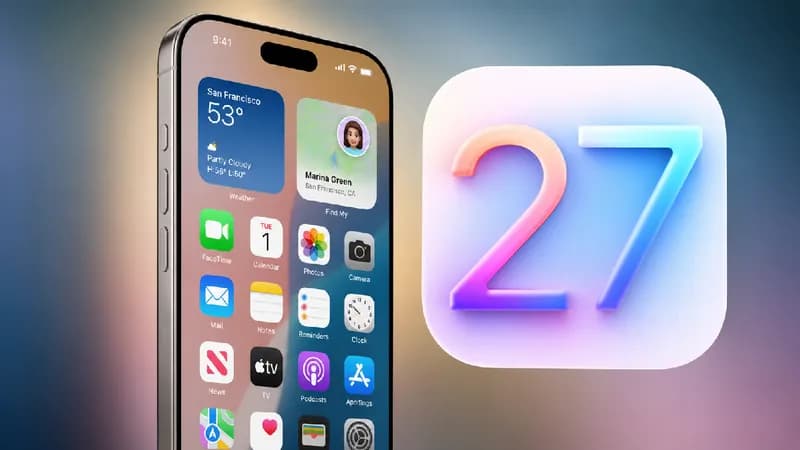
Apple has released iOS 27 Beta 5 for developers, and this update is less about one massive headline feature and more about polishing the iPhone experience before the stable release. The latest beta brings redesigned Liquid Glass app icons, expanded Siri voice controls, improved Search options, new battery information and several smaller interface changes.
The fifth developer beta arrived after a three-week gap from the previous beta, giving developers another build to test apps, identify compatibility problems and prepare for the final iOS 27 rollout expected in September.
iOS 27 Beta 5: What's New?
The latest build continues Apple's focus on refinement. Here are the most notable changes discovered so far.
Redesigned Liquid Glass App Icons
Apple has refreshed several built-in app icons with a more detailed Liquid Glass treatment.
The updated icons include:
- Safari
- Siri
- Settings
- Remote
- App Store
- Preview
Some icons have been redesigned more substantially, while others receive additional layers and visual detail. Apple is also continuing to adjust the transparency of the Liquid Glass interface.
The changes may look small, but they show that Apple is still fine-tuning the visual language introduced with its recent software redesign.
Siri Gets More Voice Customisation
Siri is one of the biggest stories surrounding iOS 27, and Beta 5 expands its voice customisation options.
Users can now adjust Pace and Expressivity across all seven American Siri voices and four British voices. The processing happens on the device, which means the feature requires more capable hardware.
Apple's redesigned Siri is built around Apple Intelligence and is intended to offer more conversational responses, personal context and deeper interaction with apps. Apple says Siri AI will bring richer answers, natural conversations and the ability to take actions across apps.
However, not every iPhone will receive every advanced Siri feature.
Search Gets More Useful
Apple has also refined the new Search or Ask experience.
The animation has been adjusted so suggestions appear more naturally alongside the search bar. Beta 5 also adds a Search the Web option at the bottom of results, allowing users to move directly to a broader web search.
There are also new controls for app results. Users can choose whether apps appear in Search and can set the number of app results displayed. Options include disabling app results or showing four or eight apps, along with a separate setting for app shortcuts.
Contacts Gets a Handy Change
The Contacts app now surfaces a saved contact's company name directly below their name in list views.
The company information can also appear in Search results. It's a small addition, but it can make a difference when users have several contacts with similar names.
Battery Settings Can Explain Drain
One of the more practical changes in iOS 27 Beta 5 is found in Battery settings.
The system can now warn users when a poor cellular connection is contributing to increased battery consumption. This gives users a clearer explanation for unusual battery drain instead of simply showing that battery usage has increased.
Apple has also added the date of the most recent software installation to the Settings > General > About section, which could be useful when troubleshooting an iPhone.
Mail Adds Smart Reply Control
The Mail app now includes a Personalize Smart Replies option.
The setting is switched off by default and can be enabled through Mail settings. It gives users more control over Apple's AI-powered reply suggestions.
Clock, Control Center and 5G Changes
Several smaller changes are also included:
- The Alarms and Timers sections in the Clock app use a thicker font.
- Control Center no longer displays cellular connection information when the iPhone is connected to Wi-Fi.
- 5G+ support has been enabled in Spain.
- Apple has added splash screens explaining what's new in Photos, Wallet and Music.
- The Apple Wallet Create a Pass feature is expanding beyond the United States.
These aren't headline-grabbing additions, but together they make Beta 5 feel like a polishing release rather than a major feature drop.
iOS 27 Supported iPhones
Apple has confirmed that iOS 27 maintains compatibility with the same iPhone models supported by iOS 26. That means the iPhone 11 generation remains eligible, along with newer models.
The supported lineup includes:
- iPhone 11, 11 Pro and 11 Pro Max
- iPhone SE (2nd generation) and newer
- iPhone 12 series
- iPhone 13 series
- iPhone 14 series
- iPhone 15 series
- iPhone 16 series
- iPhone 17 series
- iPhone Air
- iPhone 17e
However, software compatibility does not mean every iPhone gets every iOS 27 feature. Advanced Apple Intelligence and Siri capabilities require newer hardware. The iPhone 17 Pro, iPhone 17 Pro Max and iPhone Air are among the models supporting the most advanced on-device Siri voice features.
How to Install iOS 27 Beta 5
If you're an eligible developer and want to test the latest build, first back up your iPhone. Beta software can contain bugs and should not be treated like a stable release.
Then follow these steps:
- Sign in to the Apple Developer Program with your Apple Account.
- Open Settings on your iPhone.
- Go to General > Software Update.
- Tap Beta Updates.
- Select iOS 27 Developer Beta.
- Return to the Software Update screen.
- Tap Download and Install when Beta 5 appears.
Apple's developer beta is intended primarily for testing applications and compatibility. If the iPhone is your primary device, waiting for a more stable build is the safer choice.
When Will iOS 27 Release for Everyone?
The final version of iOS 27 is expected to arrive in September 2026, following Apple's usual major iOS release cycle. Apple has positioned iOS 27 around the redesigned Siri AI experience, Apple Intelligence improvements, Liquid Glass refinements and broader performance and usability changes.
For now, Beta 5 suggests Apple is concentrating heavily on the details. Rather than simply adding more features, the company is tightening animations, adjusting interface elements, improving system controls and expanding the capabilities that will matter in everyday iPhone use.
For developers, that's an important sign: the closer iOS 27 gets to its public release, the more these smaller refinements will determine how polished the final experience feels.